| Estilo |
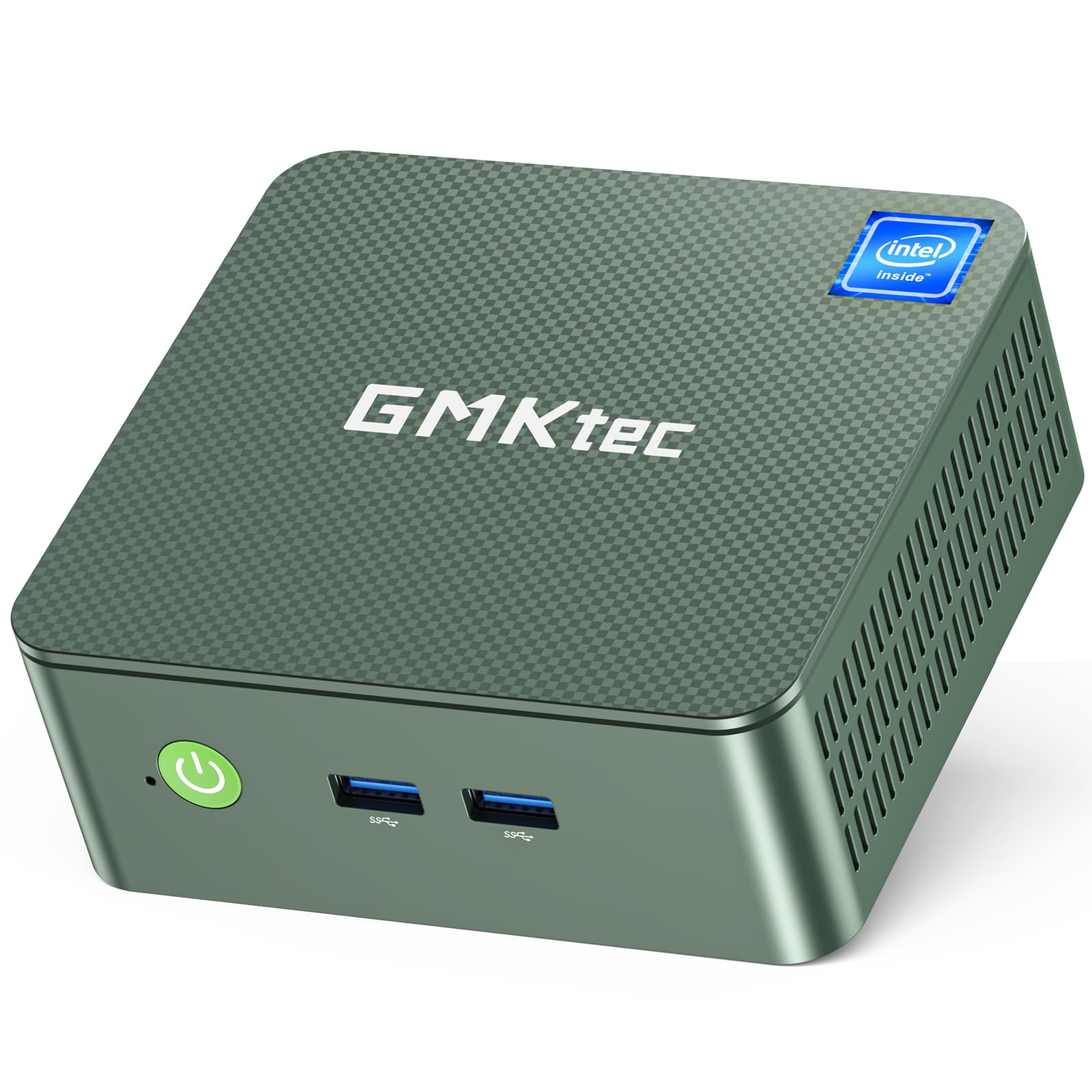
G3 Plus, G9 PLUS
|
| Tamaño |
8GB DDR4 + 256GB SSD, 12GB DDR5 + 1TB SSD, 16GB DDR4 + 512GB SSD, 16GB DDR4 + 1TB SSD
|
| Tamaño Memoria Caché Instalada |
6 MB
|
| Capacidad de almacenamiento |
16 GB
|
| Memoria RAM Instalada |
16 GB
|
| Capacidad máxima de la memoria RAM |
16 GB
|
| Velocidad Memoria |
3200 MHz
|
| Tipo RAM |
DDR4 SDRAM
|
| Velocidad Reloj Memoria |
3200 MHz
|
| Número de modelo |
G3 PLUS
|
| Nombre Modelo |
G3 PLUS
|
| Contenido de la caja |
Manual de usuario, Montaje VESA con tornillos, Cable HDMI, Cable HDMI., GMKtec Nucbox G3 PLUS Mini PC Intel Twin Lake N150 16GB RAM 512GB Disco duro, Fuente de alimentación y cable
|
| Marca del procesador |
Intel
|
| Año Modelo |
2024
|
| Número Modelo CPU |
N150
|
| Fabricante del procesador |
Intel
|
| Opinión media de los clientes |
4.4 4.4 de 5 estrellas
(1,154)
var dpAcrHasRegisteredArcLinkClickAction;
P.when('A', 'ready').execute(function(A) {
if (dpAcrHasRegisteredArcLinkClickAction !== true) {
dpAcrHasRegisteredArcLinkClickAction = true;
A.declarative(
'acrLink-click-metrics', 'click',
{ "allowLinkDefault": true },
function (event) {
if (window.ue) {
ue.count("acrLinkClickCount", (ue.count("acrLinkClickCount"), 0) + 1);
}
}
);
}
});
P.when('A', 'cf').execute(function(A) {
A.declarative('acrStarsLink-click-metrics', 'click', { "allowLinkDefault" : true }, function(event){
if(window.ue) {
ue.count("acrStarsLinkWithPopoverClickCount", (ue.count("acrStarsLinkWithPopoverClickCount"), 0) + 1);
}
});
});
4.4 de 5 estrellas
|
| Clasificación en los más vendidos de Amazon |
nº209 en Computadoras y Accesorios (Ver el Top 100 en Computadoras y Accesorios) nº4 en Minicomputadoras
|
| ASIN |
B0DN51KD9D
|
| Altura del artículo |
4,2 centímetros
|
| Fabricante |
Shenzhenshi Jimokekejiyouxiangongsi
|
| Descripción de la garantía |
1 año de garantía
|
| Unidad de medida del tamaño de la pantalla |
75 Pulgadas
|
| Resolución máxima de la pantalla |
3840x2160 Pixels
|
| Tipo de pantalla |
LED
|
| Ratio de aspecto |
16:09
|
| Resolución |
3840 x 2160
|
| Resolución Nativa |
3840 x 2160
|
| Puertos USB |
4
|
| Puertos HDMI |
2
|
| Salidas de vídeo |
2
|
| Tipo de altavoces |
Externo
|
| Tipo de diseño de ordenador personal |
Mini PC
|
| Color |
Verde (Lush Green)
|
| Características del producto |
PC de oficina, cine en casa, señalización digital, videoconferencia, negocios, edición de vídeo y fotos, educación, uso diario, multimedia
|
| Tecnología del disco duro |
PCIe 3.0 M.2 2280 NVMe/ M.2 2242 SATA
|
| Interfaz Hardware |
Ethernet, HDMI, Audio de 3.5 mm, USB 3.2 Gen 1, 802.11 ac/b/g/n, Bluetooth 5, PCI Express x16
|
| Consumo energético |
6 Vatios
|
| Dimensiones Artículo |
4,49 x 4,17 x 1,65 pulgadas
|
| Características de seguridad |
Características de seguridad integradas de Windows 11 Pro
|
| Especificaciones energéticas |
Falso
|
| Salida de vídeo |
HDMI
|
| Interfaz Salida Vídeo |
HDMI
|
| Interfaz del disco duro |
PCI Express x16
|
| Nombre de estilo |
G3 Plus
|
| Método Enfriamiento |
Aire
|
| Dispositivos compatibles |
Ratón, Monitor, Teclado, Televisión, Altavoz
|
| Tipo de enchufe |
Tipo A - 2 clavijas (norteamericano)
|
| Tarjeta gráfica |
Integrado
|
| Procesador de gráficos |
Gráficos Intel 1000MHz
|
| Memoria RAM |
16 GB
|
| Tipo de RAM de la tarjeta gráfica |
Compartida
|
| Interfaz de tarjeta gráfica 1 |
Integrado
|
| Tipo de procesador |
Intel Mobile CPU
|
| Velocidad del procesador |
3,6 GHz
|
| Zócalo del procesador |
FCBGA1264
|
| Nº de procesadores |
4
|
| Máxima velocidad del modelo de CPU |
3,6 GHz
|
| Tecnología de conexión |
Bluetooth, USB, Ethernet, LAN, HDMI
|
| Conexión inalámbrica |
802.11a/b/g/n/ac, Bluetooth, Radiofrecuencia de 5 GHz, 2,4 GHz radiofrecuencia
|
| Tecnología inalámbrica |
Bluetooth
|
| Tipo de interfaz 1 - Tipo de interfaz 5 |
Ratón, Teclado, Botones
|
| Distribución del teclado |
QWERTY
|
| Marca |
GMKtec
|
| Sistema operativo |
OS Pro
|
| Modelo de CPU |
Intel Mobile CPU
|
| Velocidad de la CPU |
3,6 GHz
|
| Tamaño de caché |
6 MB
|
| Descripción de la tarjeta gráfica |
Integrado
|
| Coprocesador de gráficos |
Gráficos Intel 1000MHz
|
| Capacidad de almacenamiento de memoria |
16 GB
|
| Ranuras de memoria disponibles |
1
|
| Usos específicos del producto |
Profesional, Educativo, Uso diario
|
| Feature |
GMKtec Garantía: GMKtec ofrece una garantía limitada de 1 año para cada mini PC, a partir de la fecha de compra. Todos los defectos debido al diseño y la mano de obra están cubiertos. Con un equipo profesional de posventa siempre listo para atender sus necesidades, simplemente puede relajarse y disfrutar de su mini PC.
|
Jay –
Surprisingly good miniPC, especially for the price
Having dove into film photography over the past few years, and having spent many hours waiting for my PC to scan negatives when I would like to be doing other things, I thought it might be interesting to see if a mini-PC could handle my scan jobs, which can easily take 15 - 20 minutes for about 6 images. There is no strong GPU requirements - the PC just needs to keep up with the USB scanner.When I saw info about the N100 series CPUs, I immediately thought of the old Intel Atom processors that were common back when mini notebooks were a thing. I am very happy to say that no, the N100 series is considerably more powerful, and is likely on par with my first quad core CPU, an Intel i7 860. It's not the fastest CPU, but it is more than capable for traditional desktop tasks. I would not pick it for gaming, for example. But if I just needed to browse the web, send emails, open spreadsheets, or scan 120 film on an Epson scanner, this is a great tool for the job. And the price is unbeatable. Set your expectations accordingly, and you may be very pleasantly surprised...
Amanda –
Pretty Good Mini PC
This mini PC worked great for 4 months, no issues until I received the blue screen of death, most likely a SSD corruption. I tried doing all the things to repair it and nothing worked. I tried reaching out to Microsoft but you can't call them and talk to someone, you just have to read their help section on their website. Still nothing worked to get rid of the blue screen. So I reached out via email to the company of this mini PC, GMKtec, and they were amazing. They responded quicker than what I thought they would have responded. They tried to help me repair the computer and when that didn't work, I had to return the computer to their company (make sure you keep the box and all the accessories) and as soon as it was returned, I received a replacement within a couple of days. The company even asked me to communicate that I received the replacement and if it was working properly. Just based on customer service from GMKtec, I would feel comfortable buying another one of their products. Shout-out to Julian and Terry from GMKtec for being so helpful!So why did I give this five stars? Because until the blue screen happened, it worked perfectly fine for my needs. It's unfortunate what happened, but it could have happened at any time.
A 6 personas les resultó útil
arby –
GMKtec N100 Review
Bought this on a whim just to try the smaller, lower cost NUC G3 PC. Decided to see how it would perform as a Plex Media server. Was pleasantly surprised that it performed very well. Connected it up to my HDHomerun Quattro 4 channel Off-The-Air tuner and discovered that it could record 4 separate TV channels simultaneously without any glitches. So now I use it as a dedicated media server. VLC Media Player ran smoothly, also.The G3 came preloaded with Windows 11 Pro and I did not notice any bloatware, but I did do a clean Windows 11 Pro reinstall with no issues as a precaution.After a few months I had an issue with the SSD. Contacted GMKtec support by email and they responded that day. They had me try a few tests to verify it was bad. Sent me a new SSD right away. Turns out they upgraded the SSD to a 1TB drive from a 256GB gratis. Not sure if it was deliberate or not, but I’m not complaining.The G3 has 2 SSD slots – one for a 2280 type NVMe SSD and one for a shorter 2242 SATA SSD. It comes with the NVMe SSD installed in the 2280 slot. While I was waiting for my SSD replacement, I re-imaged the OS on a spare 2242 SATA SSD and tried it out, and it’s been working with no issues. Read somewhere where someone tried the PC with both slots installed but had trouble booting, but I did not try this. I only had one SSD installed at a time.I see where the G3 has been updated to the G3+ which now uses the Intel N150 processor instead of N100. The G3 or the G3+ should be more than capable of handling most light-weight applications.
A 15 personas les resultó útil
Frank / Somewhere in GA, USAFrank / Somewhere in GA, USA –
An almost perfect non-gaming mini PC!
Almost a perfect mini computer!I'm not a computer engineer, but, I have a technical background and understand most things about pc's. With this said, I was hesitant getting this, as the price for the larger RAM model (16GB) seemed to good to be true, coming with a licensed Win11 operating system onboard. I was pleasantly surprised! It comes with Win 11 baked in, excellent (fast) Wi-Fi, and Bluetooth. Web pages load almost immediately. Running a several apps at once the unit gets warm, as the CPU will clock above it's normal 800MHz speed (I watched it clock to around 1.8GHz), but the fan is quiet. I had to look to see it was running.Only negative I can find, it does NOT handle multitasking (heavy loading) very well. If you have multiple apps open and ask it to transfer data, or something else, it bogs down. I would NOT use this as a gaming pc, as I think the description says it can be. The built-in video RAM is small and the clock speed is about 500MHz. Again, for Web surfing, emails, occasional word processing and spreadsheets you'll be fine! I tried creating a Recovery Disk, using a 32GB Samsung mini jump drive (it says the disk needed is 16GB), with ALL other apps I had open closed, and after waiting over 2 hours the status bar was only about 1/4 of the way across! I would strongly suggest creating and scheduling Restore Points every month, and, backing up your files to an external drive, just in case.In summary, for the price you pay, if you're not a gamer you'll be happy with this unit!
A una persona le resultó útil
Thomas –
Warranty Support was outstanding. They responded quickly and handled all issues fairly.
“. Download the Win 11 Pro OS files on another PC.2. Start the PC, find the USB flash drive, right-click the USB flash drive to format it as NTFS, and rename it to "WINPE" (There are images in the video instructions for reference)3. Extract the ZIP/ISO file (using WinRAR or another extraction application) and move the extracted files into the "WINPE" drive on the USB drive (Please use a 32GB USB Drive)4. Plug in USB drive into the Nucbox USB port and power on the computer. It should automatically start to reinstall. (If it does not reinstall, test another USB port or USB thumb drive, and make sure Boot settings are set to USB drive)5. After reinstallation, the pc should restart, if it does not restart please turn off the pc and remove the USB drive. After, enter the test mode, double-click the Cleanup Action icon and then click OK in the pop-up.During OS reinstallation do not connect to the internet, after setting up a Microsoft local account, then connect to the internet and activate the OS.“ This is what a warranty gets an elderly man with next to no technical skills.
Mikki SinghMikki Singh –
Excellent energy efficient pc for 24/7 operation for home assistant
Bought this mini pc to replace a dying raspberry pi 3 running home assistant with Ad-guard. I wanted something power efficient as running home assistant temporarily on virtualbox on windows was using between 25 and 50 watts. Without booting into windows i backed up with clonezilla, wiped and installed home assistant. TIP: in bios (ESC key), changed power limit select to high performance. Home assistant while with no intensive tasks hovered at 9 watts. Home assistant with intensive task with cpu running at 100% running folding@home was using no more than 25 watts. when power limit select is changed to balanced or quiet, at max load uses 17-19 watts and idles at 9 watts with no intensive task.Only issue i have is when turning on or rebooting, the monitor would not turn on and i have to switch hdmi port on mini pc to get image to show. i had this issue a couple of times but luckily for my purpose i will not be needing a monitor attachedOverall i am very happy with this mini pc for home assistant since it was a huge upgrade for me, i also enjoyed trying out usb booting different Linux distros (F7 is boot menu).
A 7 personas les resultó útil
John S. –
Perfect replacement for expiring Windows 10 machine
For a long time, my 88 year-old mother had an older computer that she only used for simple tasks like browsing the web and typing documents. With Windows 10 security updates expiring, she needed an upgrade. This is perfect for her needs. It comes with Windows 11 Pro. Setting it up for her so that it worked closely like what she was used to did take some time, but that is Microsoft. It boots fast and reliably. It has good video. It has 4 USB-A sockets, so everything she had before plugged in and worked. Wi-Fi is quick and reliable. It has a very small footprint. Overall, I was exactly what she needed, and with the low price, I can say we are very happy with the purchase.
A 6 personas les resultó útil
Marty B –
Faster than I expected
GMKtec G3 PLUS 8gb memory, 256gb storageI had been looking for a backup for my three year old Lenovo laptop in the event that it might quit on me in the middle of doing my taxes. I didn’t want something that cost more than a couple of hundred dollars – just something that might be able to take over in the midst of a crisis. I read a few dozen reviews of these mini PCs and most of them were far more powerful and expensive than what I needed.But around Christmas, Amazon had a deal on the GMKtec G3 PLUS mini with an N150 chip, 8 gigs of ram and a 256 gig storage drive. It clicked all my buttons. It arrived quickly (Thanks Amazon!) and I started it up within a few days.The first thing I noticed was the Windows 11 Pro operating system. I’ve never used that flavor of Windows before and found some differences from my Lenovo laptop which was upgraded from Windows 10 Home to Windows 11 Home. The other thing I found was that despite its presumably slower processor (than the Lenovo Core 5) it is pretty zippy. Nothing seemed slower or more cumbersome than what I was used to. Last, I noticed that this small green box on my desk never makes a peep – apparently there is no fan necessary to dispense heat from the processor.Plusses- This thing is tiny. It is as quiet as a church mouse, has plenty of ports (four USB3 and two HDMI ports) and takes up very little landscape on my desk.- The GMKtec G3 Plus processor is more powerful than I expected. I have one huge Excel file that contains over 20 thousand rows of data and I tested my new box by sorting the rows in different ways. It didn’t pause a bit – almost scary how fast it handles data. Again, versus my Lenovo’s Core 5 processor, I noticed no difference.- The operating system is Windows 11 Pro. I’ve never needed a Pro edition of Windows before, so I’m not sure if this is a plus or a minus. See note below about SMB access.- This dynamo is so quick at doing things that I’ve changed out my Lenovo laptop as my main machine and now use this. I keep 90% of my work on a network drive, so accessing what I need is easy, regardless of which computer I’m working on. But the extra room this small box gives me on my desk made this switch inevitable. There seems to be no downside to moving from a 12 gig Intel 5 laptop to this GMKtec.- Support is really on-the-ball. I contacted them via email over a minor issue and they got back to me within a few hours. That is extraordinary.Minuses- This is picky, but I wish GMKtec had designed the box around a USB-C power supply. Instead, they provided a fairly large power brick with a proprietary plug. Not a huge deal, but most of my laptop computers and Chromebooks take USB-C power inputs.- Windows 11 Pro will not connect to two older Buffalo NAS devices. The error seems to be connected to an issue with SMB1. No problem connecting to my newer Synology and UGreen NAS drives, but I cannot for the life of me get the GMKtec to talk to those older drives. My Lenovo laptop, running Windows 11 (not Pro) has no problem at all. This might not be an issue with GMKtec, so this, too, is a minor point.All in all, this GMKtec is an incredible bargain. It is small, sleek and impresses me every day that I use it. The storage can be supplemented with a bigger internal drive and the memory can be upgraded. It could attach to the back of a monitor that has the necessary screw ports (my monitors do not have these) for a even smaller foot print. The USB ports meet my needs and this is one of my best purchases of 2024.
A 25 personas les resultó útil
ZElectronics –
Good price for a decent performance especially if it is used as an additional TV box
Got this for only one day. Price seems to be very good for a decent quality. Unit is around the same size of a NUC13 which I own, but is substantially lower in weight, and of course also in price and performance. With that said, it provides sufficient performance to be used as a TV box. It works fine in my older HD TV, but it seemed to struggle with my 4K monitor running at 60 Hz. At this point I still don’t know if it was a problem of my monitor or the unit itself.Although not specifically mentioned in the product description, unit comes with Windows 11 Pro pre-installed. I’m a Linux person but since Windows is already there, I plan to keep it there for a while. However, I’ve tried running Remote Desktop to a Linux machine to play some videos, but the video and sound got so choppy that it was not workable. The dilemma is that I have some videos in a format that would require me to login to my MS account and perhaps buy or subscribe to some licenses if I were to play these videos in Windows, but I hate doing that, so sooner or later I might just install Linux on this PC.
A 5 personas les resultó útil
Chris Munger –
Started out great, really impressive, then it died, but customer support was excellent
For the first 24 hours, I was really impressed. Really snappy performance, 8 GB of RAM was plenty for simple tasks, and the SSD was capacious at 256 GB, considering the price. The inclusion of Windows Pro made the box almost free! However, after updating to Windows 11 Build 22H3, during the process of applying updates, the computer locked up. After 60 minutes with the computer no longer visible on the network and the keyboard and mouse non-responsive, pulled the power cord. Upon restoring power and turning on the computer, the PC was stuck for hours at the spinning circle during boot.Two more power-cycles and Windows repair interface appeared. Selected Windows Reset, Local Source (wouldn't work with cloud source), Windows began resetting. However, after a restart, computer back to the infinitely spinning circle. :-(If this had proved reliable, I'd have bought a dozen or more as remote monitoring PCs for client networks. But given that I've had good luck with the similarly priced AWOW models, I will not be investing any more money or time in the GMKTek offerings.Update 01-07-2024-----------------------Fortunately, GMKTek provides a download for a Windows 11 re-installation ISO. With this and leveraging a fair amount of knowledge of Windows installation options, was able to re-image the SSD. Unfortunately, the product key is invalidated and I had to use a spare Windows 10 product key to re-activate Windows. Unfortunate the GMKTek hasn't worked out the same relationship with Microsoft that Dell has, whereby any Windows 11 ISO used to load Windows onto a Dell OptiPlex results in an automatically activated Windows 11 installation.Bottom line is that after recreating and updating all apsects of the re-installed Windows 11 OS, the PC is back to running normally. I know to steer clear now of some driver updates. The PC has been running for about 36 hours and I'll post an update if that changes in the near future.When this PC works, it represents a great value for the money in terms of hardware specs and a Windows 11 license. However, taking into account the time issue remediation takes and the expertise required, the TCO (total cost of ownership) rises significantly. If I never have to do brain surgery on this device again, I'll still feel the cost was justified based on the performance of this sub-$200 device.P.S. I now make a complete image backup before running/installing ANY updates so I can simply restore the image backup rather than running into yet another Windows 11 re-installation process and the requirement to use/purchase another Windows product key.P.P.S. The WIndows 11 re-installation ISO download was 11 GB and was not a standard Windows 11 installation ISO. This had to be burned to a flash drive (I used a 16 GB USB3 model; I used Rufus to create the bootable UEFI flash drive) and then the GMKTek PC booted with it. Upon boot, I was faced with a terminal window and a couple of choices. The one I chose led to an image/sysprep process that fortunately got the PC bootable once again with Windows 11 Pro.P.P.P.S. Highly recommended --> As soon as you boot the device for the first time, find a tool such as ProduKey by NirSoft and extract and save the Windows 11 product key. Ideally (although I didn't have a chance to test), this key would work if a re-install was ever required. The other option, that I was waiting for until the PC was fully updated, is to create an image backup using any number of tools, including the image backup tool in Windows. Thus, if any of your update processes results in a non-bootable PC, you can simply re-image from the backup and avoid having a non-activated instance of Windows 11.Update 01-12-2024-----------------------Vendor reached out proactively and offered some assistance, although I'd resolved the corrupt Windows 11 issue independently. However, that level of customer support is remarkable considering the price of this product and the lack of such support from other vendors with much pricier offerings. Due to this, upgrading the rating to four stars.Update 01-13-2024-----------------------Customer support proactively reached out and provided a product key so I could activate Windows 11 and free up my personal product key. GMKtec's proactive reaching out to a customer with issues is almost unparalleled in my experience over 40 years, so despite the issues I encountered, I'm raising my review to five stars. For a product this inexpensive but with excellent performance, providing this level of customer support is laudable.
A 212 personas les resultó útil